Building Materials
Inside a building you're reliant on that signal passing through the walls, floors, and windows. Different materials let different amounts of energy through. Metal is highly reflective and blocks almost all signal, whereas timber and drywall lets most of it pass through. The table below gives a sense of the range.
| Material | Typical Attenuation | Equivalent Signal Loss | Notes |
|---|---|---|---|
| Drywall | 3–5 dB | ~30% | Common internal walls, minimal impact. |
| Wood / Timber | 3–6 dB | ~40% | Lets most signal through, varies with thickness and moisture. |
| Brick | 6–9 dB | ~60% | Moderate barrier, worse when multiple walls are in line. |
| Glass (Plain) | 5–8 dB | ~55% | Standard panes allow some signal, but multiple panes add up. |
| Glass (Low-E) | 20–30 dB+ | >99% | Reflective coatings severely block RF, often worse than concrete. |
| Concrete | 10–15 dB | ~70–80% | Reinforced slabs are a major source of coverage gaps. |
| Metal | 60 dB+ | >99.9% | Effectively a mirror, almost all signal is reflected. |
What makes this particularly relevant to newer buildings is the shift toward energy-efficient construction. Low-E glass, metal cladding, and dense concrete cores are now standard, and each of these is significantly more attenuating than the materials they replaced. A building that meets current energy ratings will almost always have worse indoor signal than an older one of similar size.
How much do walls affect signal?
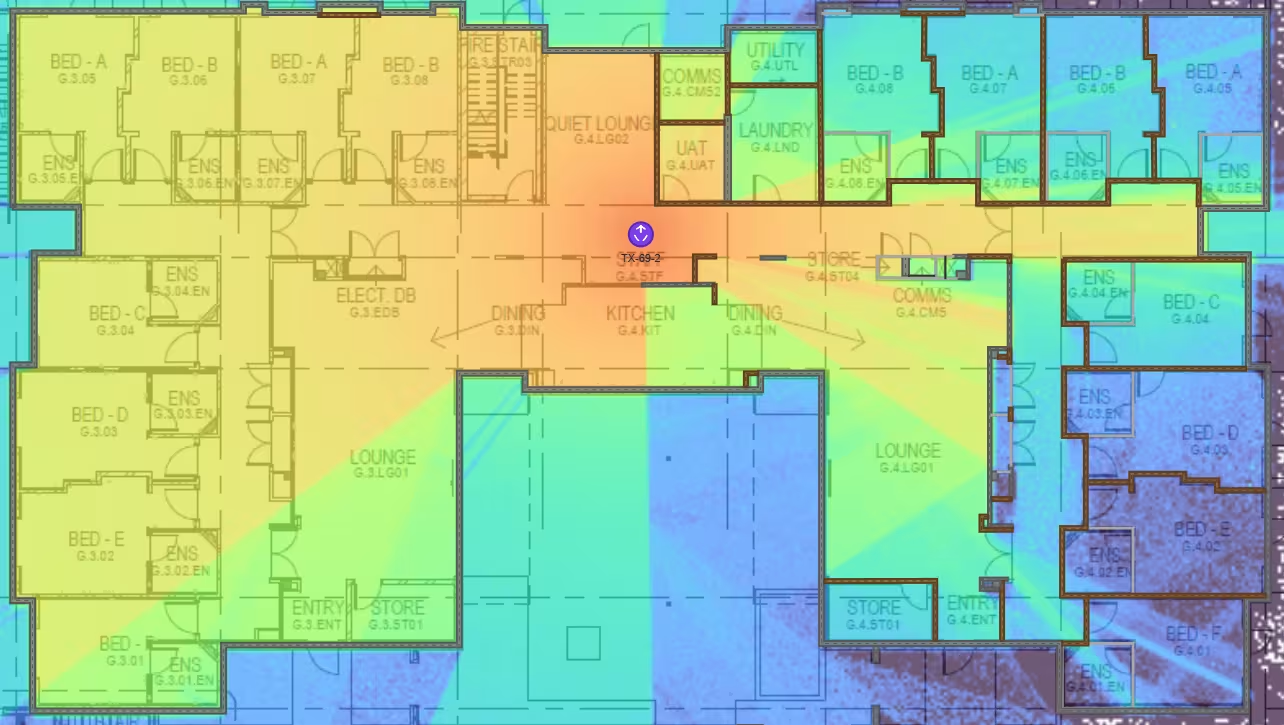
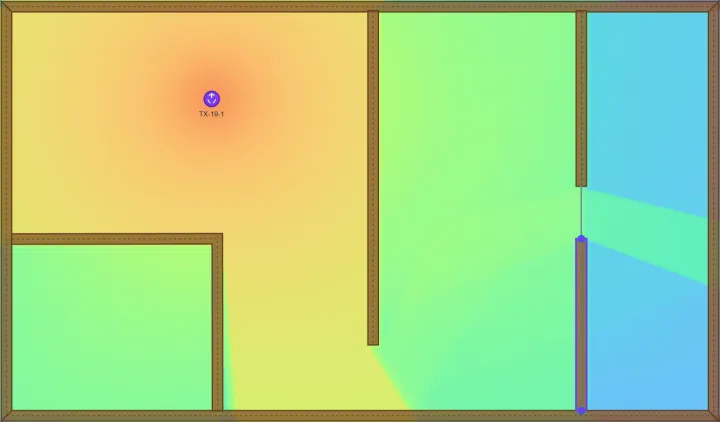
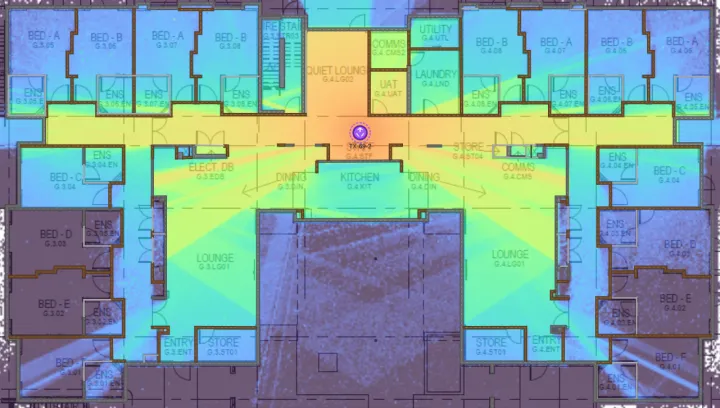
In this simulation we've drawn a simple concrete building outline with a concrete slab floor and drop-ceiling roof. The transmitter (a ceiling mounted 5G antenna) is located in the middle of the building.
To the left of the transmitter we've left it as an open space, on the right-hand side we've drawn in concrete, wood, plaster, etc., to model the building's internals.
It's easy see the massive role internal walls have on signal. Signal strength around the transmitter is red hot. In the open space to the left signal propagates well, bouncing off the roof and floor to give strong connectivity. On the right, signal is scattered and absorbed by the different materials resulting in several rooms of the building without connectivity.
Material Demonstration
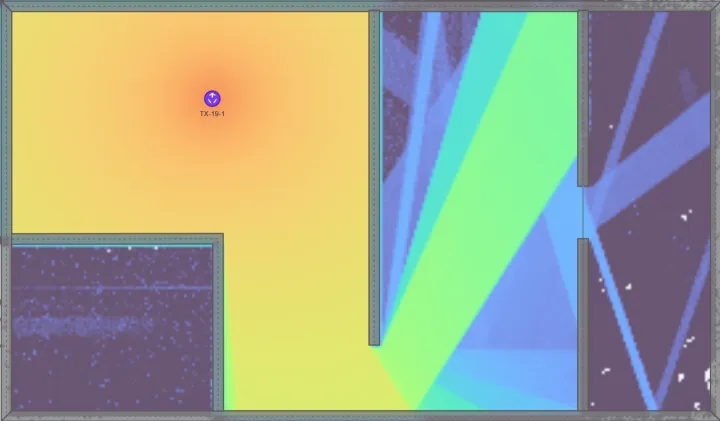
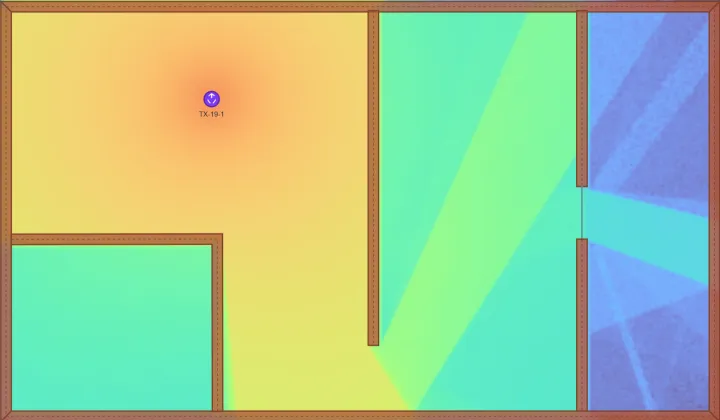
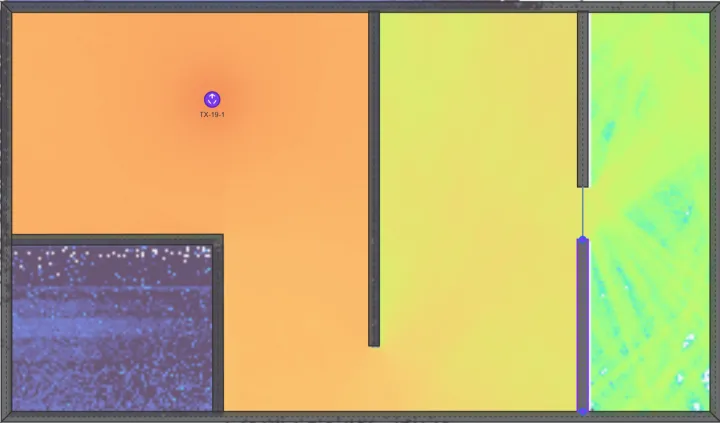
We'll use the Axidra Cloud 3D physics engine to visualise how different materials affect signal differently. We set all walls to the same material type and thickness (40 cm), and placed a glass window in the right-most wall.
We can see below that concrete tends to reflect more, with minimal energy passing through the material. Brick shows more energy passing directly through than concrete and slightly more diffusion. The all-metal environment demonstrates highly specular reflectivity, and effectively no refraction through. Conversely wood shows the most energy refracting through and least reflections of the four.
You'll see the same modelling techniques used in your IBC project during both the design phase and live monitoring.
Distance from the Tower
Signal weakens with distance. This is unavoidable physics: as a radio wave radiates outward from an antenna, its energy spreads across an increasingly large area. Double the distance and the signal strength drops by roughly 6 dB, which is about a 75% reduction in power. Triple the distance and you've lost around 10 dB. Each bar of signal on your phone equals about 6 dB, although it will differ between phone models.
In CBD and urban areas, towers are typically spaced every 500 metres to a kilometre, so the signal arriving at most buildings is reasonably strong before it has to contend with walls and windows. In suburban and regional areas the gaps widen. In parts of rural and remote Australia, the nearest tower might be 20 or 30 kilometres away, and by the time that signal reaches a building it may already be marginal before materials losses compound on top.
The signal strength at the exterior of your building sets the baseline. If the outdoor signal is strong, the building's materials determine whether coverage indoors is usable. If the outdoor signal is already borderline, even lightweight construction can push it below the threshold.
Frequency
Not all mobile signals behave the same way indoors, and a large part of the reason is frequency. Mobile networks in Australia operate across a range of bands, from 700 MHz up to 3500 MHz and beyond. Lower frequencies travel further and penetrate building materials more effectively. Higher frequencies (larger channels) carry more data but lose energy faster, both over distance and through obstacles.
The difference is substantial. A concrete wall that attenuates a 700 MHz signal by 10 dB might attenuate a 3500 MHz signal by 25 dB or more. This is one reason 5G can sometimes feel worse indoors than 4G. In Australia, the bulk data carrying capacity of 5G is achieved using the 3500 MHz band (known as n78), which offers significantly higher speeds outdoors thanks to its ultra-wide channel width, but struggles to maintain those speeds through walls that lower-frequency signals pass through more readily.
Operators manage this trade-off by using a mix of 5G bands. Low-band 5G (700 to 900 MHz) provides the reach and penetration, the lower mid-band (1800 to 2600 MHz) balances capacity and coverage, and high-band (3500 MHz+) delivers major speed where the signal path is favourable. Your phone dynamically selects the best available band, but inside a building, the higher-capacity bands are often the first to become unusable.
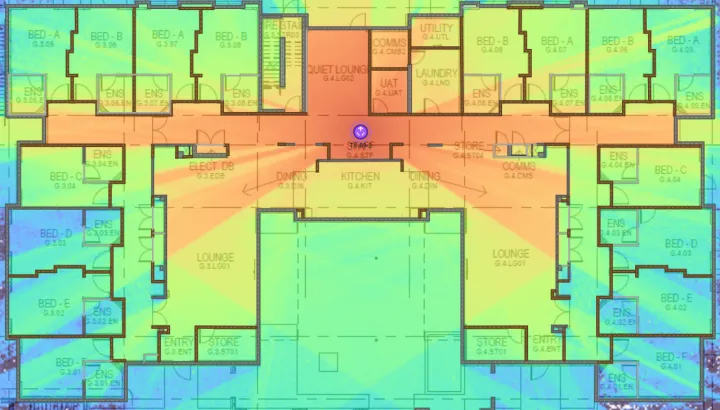
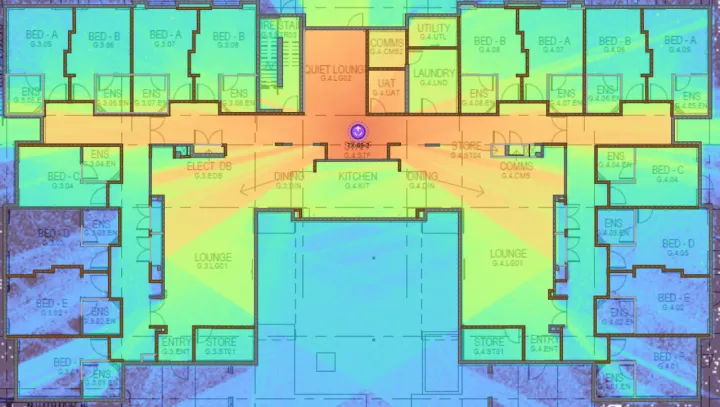
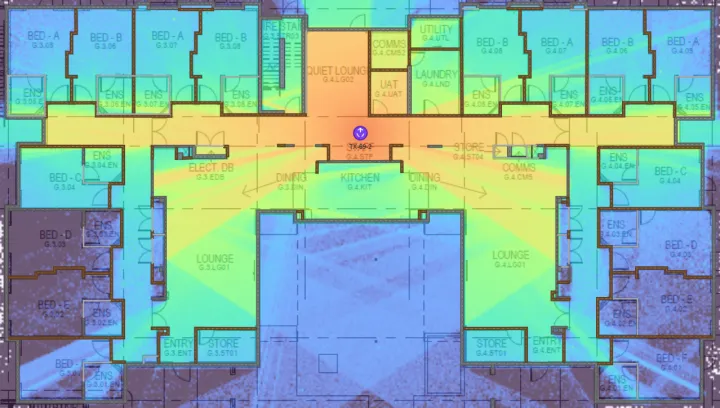
To make matters more complicated, because low-band 5G travels so far it is susceptible to self-interference from neighbouring cell towers who transmit on that same frequency band. This leads to slow data speeds and failed calls even when the phone is showing full strength.
The solution is to carefully manage which frequency bands are implemented in each building by studying not just the indoor environment but the surrounding tower configuration too.
Tower Configuration
Even if a cell tower is close by, the way its antennas are configured has a direct effect on how much signal reaches your building.
Most cell towers use directional antennas arranged in three sectors, each covering roughly 120 degrees. If your building sits squarely within a sector's coverage arc, it receives the strongest signal. If it's at the edge between two sectors, or behind the tower entirely, signal strength drops considerably, sometimes by 15 to 20 dB compared to a building at the same distance that's directly in the beam.
Antenna tilt is another factor. In urban areas, operators tilt antennas downward to concentrate coverage on the street level and limit interference with neighbouring cells. This works well for people on the ground, but it means the upper floors of a mid-rise building can sit above the main beam. The signal is still there, but it's weaker and often arriving at shallow angles that make it harder to penetrate windows and walls.
Antenna height matters too. A tower on a nearby rooftop may be at roughly the same elevation as your office, providing a relatively direct signal path. A tower mounted on a tall mast further away sends its signal at a steeper angle, which changes how it interacts with the building façade and surrounding terrain.
None of these parameters are visible to the building owner or tenant, and they're not something you can change. But they explain why two buildings on the same street, at the same distance from the same tower, can have very different indoor coverage.
Obstructions
The path between a cell tower and your building is rarely clear. Terrain, other buildings, and vegetation all absorb or reflect signal before it reaches you.
Terrain is a straightforward blocker. A hill or ridge between the tower and your building creates a shadow zone where signal drops sharply. Radio waves at mobile frequencies don't bend well around solid terrain, so even a modest rise in the landscape can eliminate line-of-sight and reduce signal by 20 dB or more. In hilly parts of Australian cities like Hobart, Brisbane's western suburbs, or the Adelaide Hills, terrain shadowing is a common contributor to indoor coverage problems.
Other buildings create a similar effect in urban environments. Tall structures between your building and the tower absorb and reflect signal, creating what's known as an urban canyon where coverage depends heavily on reflections rather than direct signal. This reflected signal is weaker, arrives from unpredictable angles, and can interfere with itself, resulting in patchy coverage even in buildings that are technically close to a tower.
Vegetation is the one that surprises people. A mature tree canopy can attenuate signal by 10–20 dB depending on species, density, and frequency. Eucalyptus, with its vertical leaf orientation, tends to scatter signal differently than broad-leafed deciduous trees. In areas with dense vegetation between the tower and the building, the seasonal difference can be noticeable. Coverage may improve in winter when deciduous trees lose their leaves and degrade again in spring as the canopy fills back in.
Other Factors
Beyond the main contributors above, a handful of smaller factors can affect the signal that reaches your phone indoors.
Weather has a measurable impact at higher frequencies. Rain, heavy fog, and humidity can attenuate signals above 10 GHz (relevant to mmWave 5G), though at the sub-6 GHz bands used by most current mobile services the effect is minimal. Severe storms can occasionally affect signal quality, but for most buildings and most of the time, weather is a secondary factor.
Network load doesn't weaken the signal itself, but it affects what you can do with it. A tower serving a busy area during peak hours may not have enough capacity to deliver fast data speeds to every connected device, even if the signal is strong. This is why coverage can feel worse at lunchtime in a CBD office even though nothing about the physical signal has changed.
Your phone and your body also play a role. Holding a phone in your hand attenuates the signal by 3 to 6 dB compared to placing it on a desk, and holding it to your ear adds further loss. Older phones with less capable antennas and modems will struggle in conditions where a newer phone copes adequately. The case on your phone can also contribute a small amount of attenuation, though typically only 1 to 2 dB.
None of these factors alone will make or break indoor coverage. But in a building where the signal is already marginal from distance, materials, or obstructions, they can be the difference between a connection that works and one that doesn't.